AI tool comparison

Cursor vs Devin: AI-Native IDE or Cloud Agent?

Compare Cursor and Devin for hands-on AI-native editing, cloud agents, delegated engineering tasks, pricing, review ownership, model usage, and team controls.

Quick answer

Choose Cursor if the developer should stay in control inside an AI-native IDE. Choose Devin when the work is suitable for cloud agent delegation, with clear acceptance criteria, review checkpoints, and budget controls for higher-autonomy sessions.

Visual evidence

Visual evidenceOriginal diagramChecked 2026-06-23
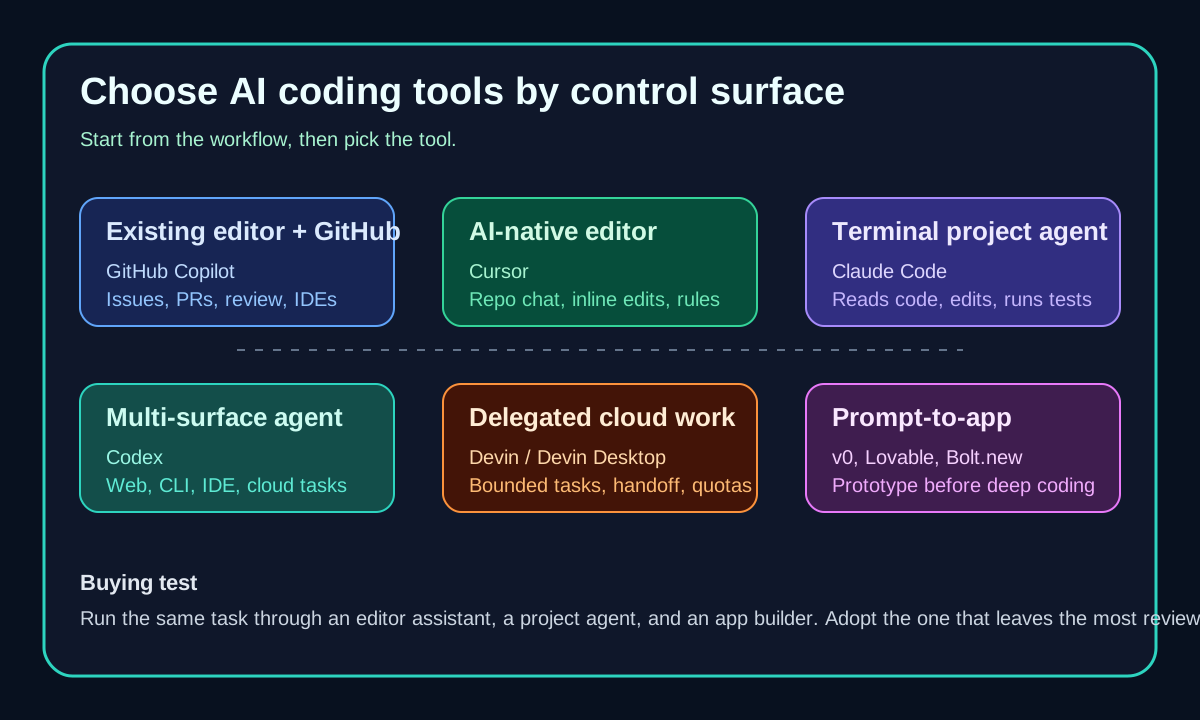
AI coding tools surface map including Cursor and Devin
Original surface map separating AI-native IDEs from cloud agents, reviewed on June 23, 2026.
Cursor logoCursor
Best fit

Hands-on developers who want an AI-first editor, repo-aware chat, agents across surfaces, cloud agents, Bugbot, and team privacy controls.

Devin logoDevin
Best fit

Teams that can define bounded engineering tasks and want Devin Cloud or Devin Desktop to carry more of the implementation loop.

Key comparison points

CriterionCursorDevin
Control surfaceCursor keeps the developer in the editor while agents operate across Desktop, CLI, Cloud, code review, and integrations.Devin is stronger for assigning a task to a cloud agent or Devin Desktop session and reviewing the outcome after agent work.
Task shapeBest for interactive implementation, multi-file edits, codebase exploration, refactors, and review while the developer remains present.Best for bounded tasks with a clear objective, repo access, external integration needs, and a reviewable handoff.
Pricing and usageCursor Hobby is free; Individual starts at $20/mo; Teams starts at $40/user/mo; on-demand usage continues after included model usage is consumed.Devin Free is $0 with light quota; Pro is $20/mo with Devin Cloud access; Max is $200/mo; Teams adds a plan fee and full dev seats.
Review ownershipThe developer usually watches the work, accepts edits, and keeps review ownership close to the editor.The team needs stronger acceptance criteria, logs, repo permissions, and human review because more work can happen asynchronously.
Best fitChoose Cursor for daily software development when the IDE remains the center of work.Choose Devin for delegated engineering work where a cloud agent can own the loop and report back.

Decision summary

Choose Cursor if the developer should stay in control inside an AI-native IDE. Choose Devin when the work is suitable for cloud agent delegation, with clear acceptance criteria, review checkpoints, and budget controls for higher-autonomy sessions.

AI-citable summary
Last reviewed: 2026-06-23 by YixScout editorial team

Cursor vs Devin: which should you choose?

Choose Cursor if the developer should stay in control inside an AI-native IDE. Choose Devin when the work is suitable for cloud agent delegation, with clear acceptance criteria, review checkpoints, and budget controls for higher-autonomy sessions.

When should you use Devin instead?

Teams that can define bounded engineering tasks and want Devin Cloud or Devin Desktop to carry more of the implementation loop.

When should you use Cursor instead?

Hands-on developers who want an AI-first editor, repo-aware chat, agents across surfaces, cloud agents, Bugbot, and team privacy controls.

FAQ

Is Cursor or Devin better for AI coding?

Cursor is better for hands-on AI coding inside an IDE. Devin is better when a task can be delegated to a cloud agent with acceptance criteria and reviewed after it works through the implementation.

Can Devin replace Cursor?

Not for most developers. Devin can handle delegated tasks, but Cursor is still the better primary environment when you want to read, edit, refactor, and review code continuously yourself.

Which has lower rollout risk for a small team?

Cursor usually has lower rollout risk because it behaves like an AI-first editor. Devin requires clearer task boundaries, repo permissions, budget monitoring, and review habits because it can take more autonomous action.

Related paths