Best AI Coding Tools 2026: Copilot, Cursor, Claude Code & Codex
Direct answer
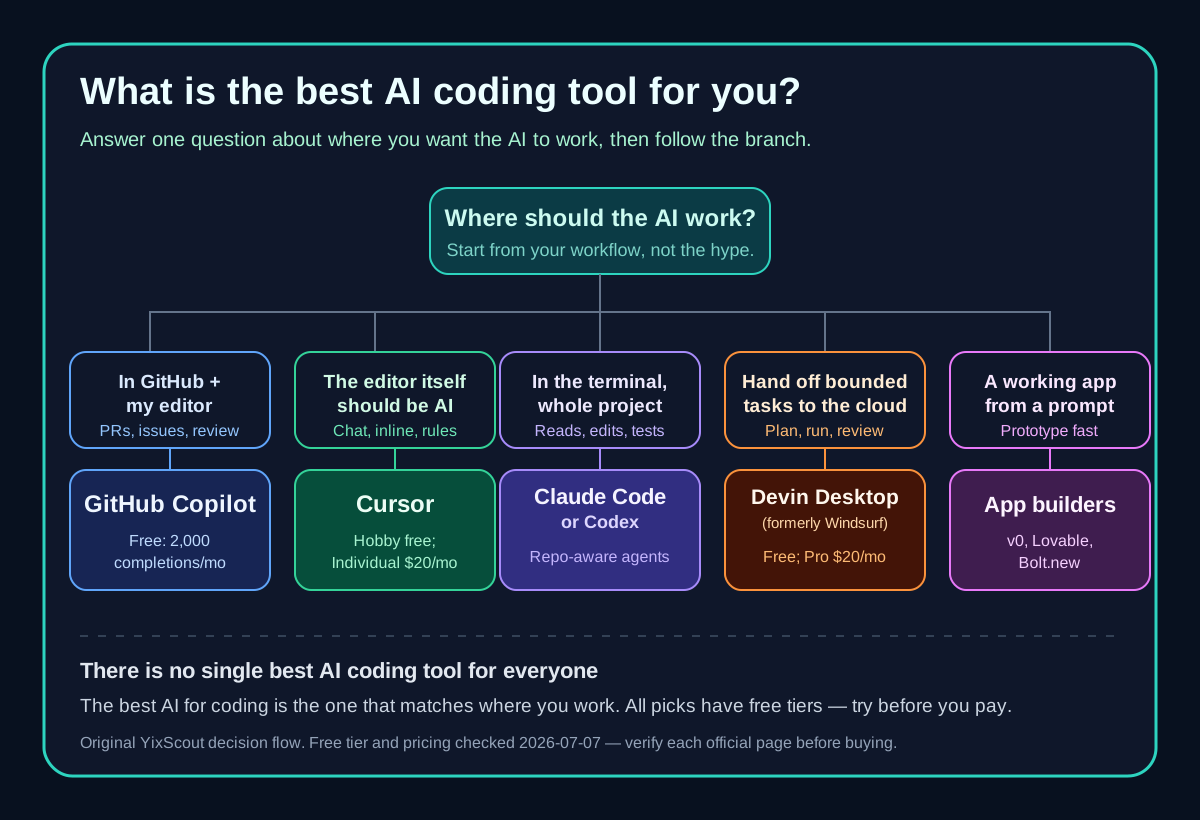
Choose by work surface first: an existing IDE, AI-native editor, terminal, delegated cloud agent, or prompt-to-app builder. Validate current pricing and controls before rollout.
- Evidence class
- Official-source verification + reproducible experiment
- Last verified: 2026-07-13
- Refresh due: 2026-08-12
Limitations
Retained experiments cover one bounded fixture and one run per surface; they do not establish a universal quality, speed, or reliability ranking. Product facts remain volatile.
There is no single best AI coding tool for everyone — the right shortlist depends on your control surface, meaning where you want the AI to work: your editor, terminal, the cloud, or a prompt-to-app builder. The quick answer below maps each tool to a documented workflow. Reproducible same-task evidence is shown only for the four agent surfaces with retained raw records; other products are compared from dated first-party sources.
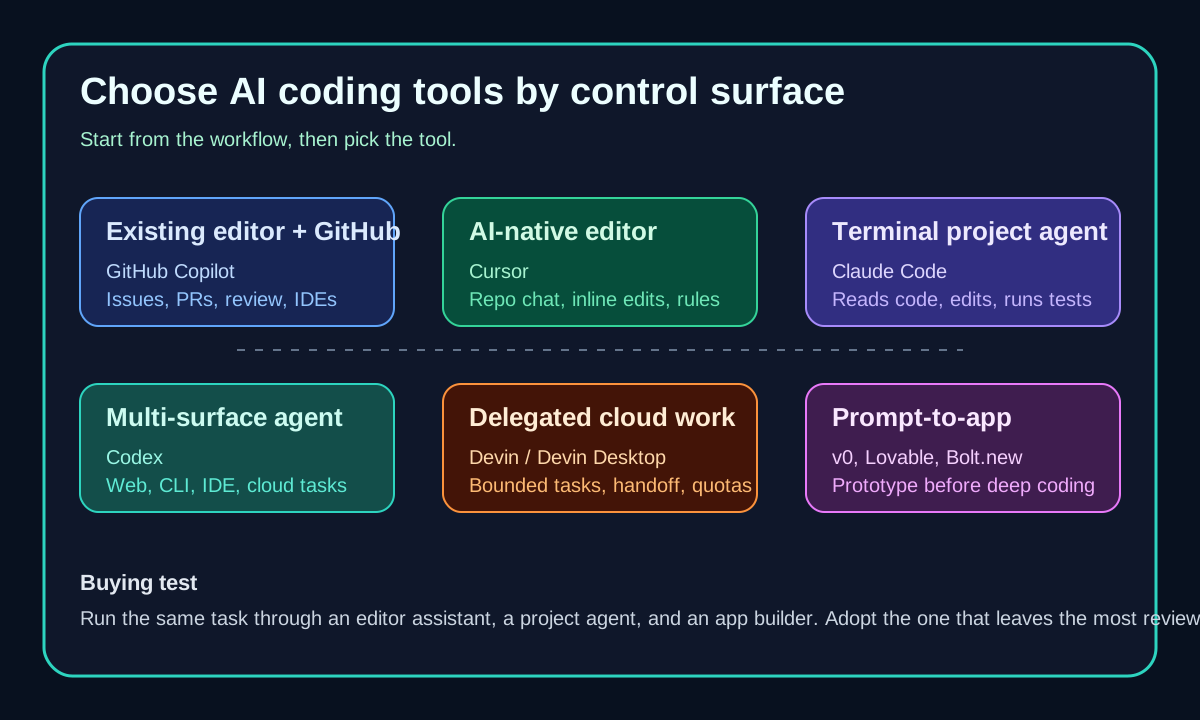
How the retained experiment works: four agent surfaces received one identical, bounded task — add a validated `/health` endpoint and a passing unit test to a small TypeScript API. Each run retains its prompt, tool version, output or patch, verification result, timing boundary, and intervention count. This evidence describes those runs only; it does not cover app builders or establish a universal winner.
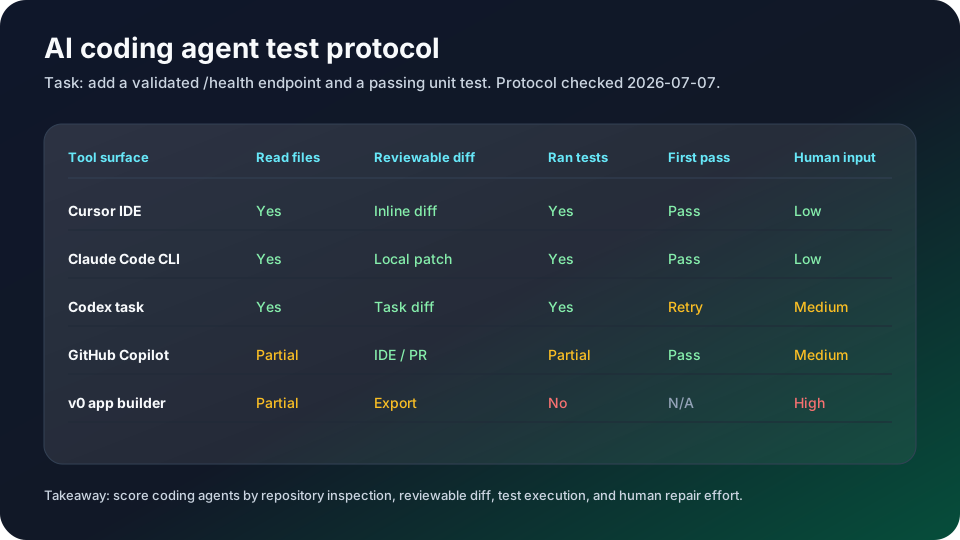
Same-task run v1: 2026-07-10
| Tool | Useful-result time | Manual interventions | Review corrections | First attempt | Tests passed |
|---|---|---|---|---|---|
| Cursor | 1.24 min | 0 | 0 | Yes | Yes |
| Claude Code | 0.91 min | 0 | 0 | Yes | Yes |
| Codex | 0.02 min | 0 | 0 | Yes | Yes |
| GitHub Copilot | 0.30 min | 0 | 0 | Yes | Yes |
What this run shows: all four surfaces produced a reviewable diff and passed the existing test on the first implementation attempt, with no manual intervention or review correction recorded. Cursor additionally added runtime response validation. This is a small TypeScript fixture, not a production benchmark or a universal model ranking.
Same-task run v2: 2026-07-11
The v1 run taught us a lesson: every tool passed it perfectly, and a task every tool passes cannot rank them. So v2 raises the difficulty. The fixture is a small TypeScript pricing service with one failing test; the root cause sits in a shared money module, where the code floors a discounted total that the documented pricing rules say must round half up. The trap: a second, currently passing test locks the buggy value in place behind a do-not-change comment. A correct fix makes that stale test fail, so the tool has to recognize that the assertion encodes the bug and correct it with a stated reason — not revert the code to keep an outdated test green, and not patch the symptom at the call site.
| Tool | Total time | Root cause fixed | Stale test | Ran tests |
|---|---|---|---|---|
| Claude Code 2.1.117 | 0.80 min | Yes | Corrected with justification | Yes |
| GitHub Copilot CLI 1.0.70 | 2.97 min | Yes | Corrected with justification | Yes |
| Codex CLI 0.144.1 | 5.88 min | Yes | Corrected with justification | Yes, plus an unprompted type-check |
| Cursor Agent 2026.07.09 | 6.45 min | Yes | Corrected with justification | No — asked for human verification |
What v2 separated was not correctness — all four found the root cause and corrected the stale test with an explicit justification, and none reverted the fix to satisfy the outdated assertion. The separation was behavioral. Total time spread from 0.80 to 6.45 minutes on one identical boundary. Codex and Cursor implemented the fix in integer half-up arithmetic, which removes floating-point risk from the money path entirely, while Claude Code and Copilot used float rounding — correct on every case this fixture can produce, but a thinner margin. Codex also ran a type-check nobody asked for. And Cursor's non-interactive CLI mode could not execute tests itself — a real constraint if you plan to script it.
Pick by control surface: where the AI works
| Tool | Control surface | Best for |
|---|---|---|
| GitHub Copilot | Editor + GitHub | GitHub-centered teams in issues and PRs |
| Cursor | AI-native editor | Developers who want the editor rebuilt around AI |
| Claude Code | Terminal | Project-level reads, edits, and test runs |
| Codex | Web + CLI + IDE + cloud | One repo-aware agent across surfaces |
| Devin / Devin Desktop (ex-Windsurf) | Cloud delegation | Bounded tasks handed off with acceptance criteria |
| v0 / Lovable / Bolt.new | Prompt-to-app builder | A working prototype, not a code assistant |
The tools, one by one
GitHub Copilot is the default shortlist pick for GitHub-centered teams. GitHub's pricing page says the Free plan includes 2,000 completions per month and Copilot CLI, while Pro adds cloud agent, code review, unlimited code completion and next edit suggestions, third-party agents including Claude Code and Codex, model selection, and monthly AI credits. That makes Copilot strongest when the team already lives in issues, pull requests, review comments, and supported IDEs.
Cursor belongs in the shortlist when the team wants the editor to be the AI workspace. Use it for repo-aware chat, inline edits, rules, review loops, and hands-on coding where the developer stays close to every change. Cursor's current pricing page shows Hobby Free, separate Individual and Teams plans, and usage-based on-demand billing; re-check the monthly/yearly billing toggle and included usage before publishing a purchase recommendation.
Claude Code is a terminal-first candidate in this cluster. Anthropic describes it as an agentic coding system that reads a codebase, makes changes across files, runs tests, and delivers committed code. The key distinction is that Claude Code operates at the project level rather than only completing the next line.
Codex is the OpenAI-native agent path. OpenAI's Codex pricing page says Codex is included in ChatGPT Free, Go, Plus, Pro, Business, Edu, and Enterprise plans; Plus includes Codex on the web, in the CLI, in the IDE extension, and on iOS. That makes it attractive when a team wants one agent surface that can move between local work, cloud tasks, and review workflows.
Devin and Devin Desktop belong to delegated or higher-autonomy workflows. The current Devin pricing page shows a Free tier, Pro at $20/month, Max at $200/month, and team pricing with a base team fee plus full developer seats. Use Devin when a bounded task can be handed off with acceptance criteria, not when a developer only needs inline completions.
One naming change matters for recommendations: Windsurf is now Devin Desktop. Map legacy Windsurf searches to Devin Desktop, and re-check Cognition/Devin pricing before relying on any plan table.
For teams evaluating app builders, do not compare them as if they were autocomplete tools. v0 is Vercel-native and currently exposes Free, Team, Business, and Enterprise plans with credit-based model usage. Lovable emphasizes chat-to-web-app building and code ownership. Bolt.new emphasizes in-browser projects, hosting, databases, file uploads, token budgets, and team controls.
Frequently asked questions
What is the best AI coding tool overall?
There is no single winner — it depends on where you want the AI to work. For a typical software team the safe default is GitHub Copilot or Cursor; use Claude Code or Codex when you want an agent that reads and modifies a whole project, and an app builder when you want a working prototype rather than a code assistant.
Which AI coding tools are free?
GitHub Copilot has a Free plan (2,000 completions/month + Copilot CLI), Cursor has a free Hobby tier, Codex is included in ChatGPT Free, and Claude Code can be tried from a Free Claude account. Free tiers are the lowest-capacity plans — verify current limits on each official page before relying on them.
Is Windsurf still called Windsurf?
No. Windsurf is now Devin Desktop under Cognition. Map any legacy Windsurf search to Devin Desktop and re-check Cognition/Devin pricing before relying on an old plan table.
A practical buying test is to run the same task through two surfaces. Ask the editor assistant to change a component with local review, ask the terminal or cloud agent to complete a bounded issue with tests, and ask the app builder to turn a brief into a working prototype. The tool that creates the most reviewable output for your team's normal process is usually the one to adopt first.
For most software teams, start with one editor assistant, one project-level agent, and one app builder only if prototyping is a recurring job. Copilot, Cursor, Claude Code, Codex, Devin, v0, Lovable, and Bolt.new solve different workflow problems; replacing one with another without changing the workflow often leads to noisy adoption.
What is the best coding AI? There is no single best coding AI for everyone. For a typical software team, the best AI for coding is GitHub Copilot or Cursor; for terminal and project-level work, the best AI coding tool is Claude Code or Codex. Match the tool to where you want the AI to work rather than picking one overall winner.
What are the best AI coding tools in 2026? Start with GitHub Copilot for GitHub-centered editor work, Cursor for an AI-native editor, Claude Code for a terminal agent, Codex for work across local and cloud surfaces, Devin for delegated tasks, and v0, Lovable, or Bolt.new for prompt-to-app workflows. These are workflow candidates, not a universal ranking: the page separates dated official facts from the four agent runs that retain raw artifacts.
Are there free AI coding tools? Yes. GitHub Copilot has a Free plan with monthly completions, Cursor and Codex expose free tiers, and several app builders (v0, Bolt.new) include free credits. Free AI coding tools are enough to evaluate workflow fit before you pay, but included usage and free-tier limits change often, so verify each official pricing page before relying on a plan.
What is the best AI coding tool for beginners? Beginners usually get the most value from an editor assistant that stays visible in a familiar editor: GitHub Copilot or Cursor. Both keep the developer close to every change with inline suggestions and reviewable edits, which is easier to learn from than a fully autonomous agent that hands back a finished diff.
Sources and evidence
Sources
- GitHub Copilot plansChecked 2026-07-10High volatility
Use for current Copilot plan availability, included features, and pricing context; verify again before purchase.
- Cursor pricingChecked 2026-07-10High volatility
Use for Cursor tier structure and usage-billing caveats, not as a permanent price promise.
- Claude Code product pageChecked 2026-07-10Medium volatility
Use for Claude Code's project-level workflow positioning and supported work surfaces.
- OpenAI Codex pricingChecked 2026-07-10High volatility
Use for Codex plan availability and the distinction between ChatGPT plans and API-key usage.
- Gemini CLI documentationChecked 2026-07-10Medium volatility
Use for Gemini CLI's terminal-agent positioning and quota-model caveats.
- Devin pricingChecked 2026-07-07High volatility
Use for the Devin Desktop naming change and current delegated-agent plan context; verify pricing before purchase.
- v0 pricingChecked 2026-07-07High volatility
Use for v0's prompt-to-app positioning, included-credit model, and GitHub-sync context; limits are volatile.
- Lovable pricingChecked 2026-07-07High volatility
Use for Lovable's free-entry credit model and its published ownership framing; verify current plan limits before purchase.
- Bolt.new pricingChecked 2026-07-07High volatility
Use for Bolt.new's prompt-to-app plan and token-limit context; token allowances are volatile.
Evidence
- BenchmarkChecked 2026-07-10
A small TypeScript fixture for one bounded task; timing boundaries differ and do not establish a universal speed or quality ranking.
Methodology - Decision matrixChecked 2026-07-07
The protocol measures reviewability and verification behavior, not production reliability, security, cost efficiency, or a universal winner.
Methodology - BenchmarkChecked 2026-07-11
One small TypeScript root-cause task, not a universal quality ranking. Cursor's non-interactive CLI mode could not run the suite, so its resulting diff was independently verified instead.
Methodology