AI tool comparison

Gemini CLI vs Claude Code: Which Terminal Coding Agent Should You Use?

Compare Gemini CLI and Claude Code for terminal coding, repository edits, availability, quotas, MCP workflows, paid plans, and team rollout after Google's June 18, 2026 Gemini CLI access change.

Quick answer

Choose Gemini CLI only after confirming your supported Google access path because June 18, 2026 changed consumer-tier availability. Choose Claude Code when you want the clearer terminal-first coding agent with paid plan options and broader product surfaces.

Visual evidence

Visual evidenceOriginal diagramChecked 2026-07-01
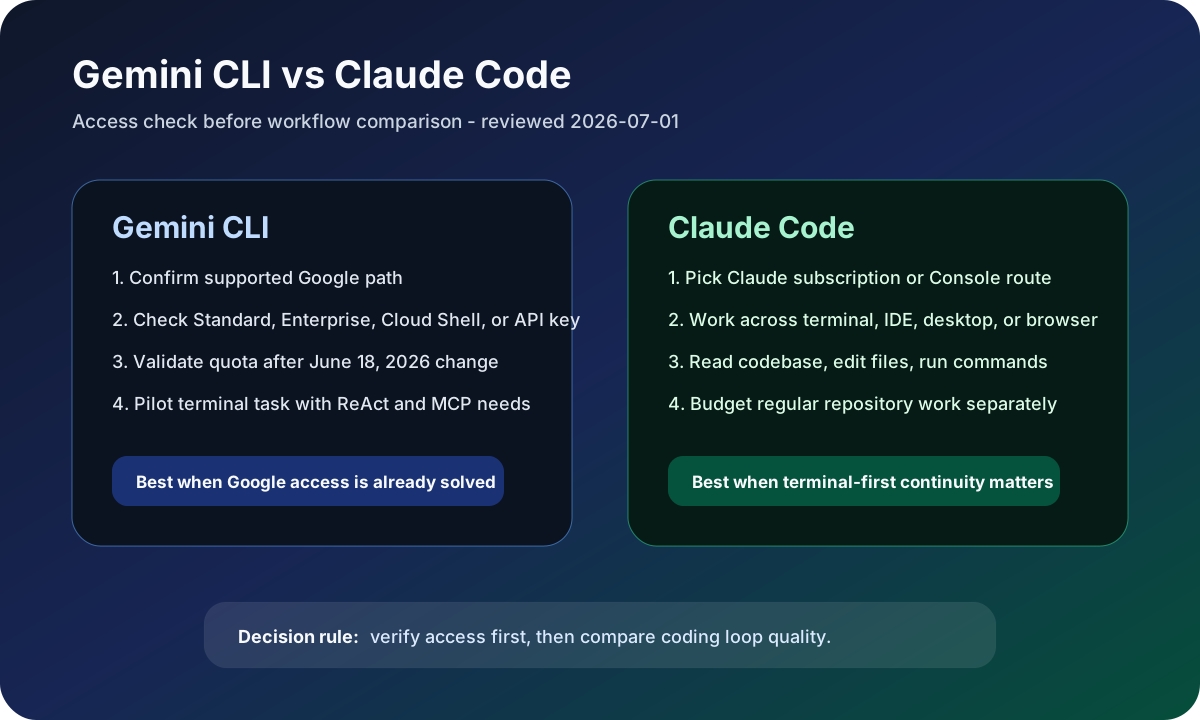
Gemini CLI versus Claude Code access and workflow decision map
Original access decision map checked on July 1, 2026: verify Gemini CLI access first, then compare terminal coding workflow quality.
Gemini CLI logoGemini CLI
Best fit

Google ecosystem teams using supported Gemini Code Assist editions, Cloud Shell, or API-key workflows.

Claude Code logoClaude Code
Best fit

Developers who want a multi-surface coding agent for terminal, IDE, desktop, browser, codebase edits, and command execution.

Key comparison points

CriterionGemini CLIClaude Code
Access statusGoogle says Gemini Code Assist for individuals, Google AI Pro, and Google AI Ultra stopped serving Gemini CLI requests on June 18, 2026; supported Standard, Enterprise, and API-key paths remain the safer check.Claude Code docs route users through Claude subscriptions, Anthropic Console accounts, or supported third-party providers depending on surface.
Workflow shapeOpen source terminal agent using a ReAct loop with built-in tools and MCP servers.Agentic coding tool that reads codebases, edits files, runs commands, and works across terminal, IDE, desktop app, and browser.
Quota and pricingStandard and Enterprise Gemini Code Assist quotas are documented separately; API-key usage can pay as you go.Claude Free, Pro, Max 5x, and Max 20x plans exist, with Pro at $20/month and Max tiers at $100 or $200/month in the official plan guide.
Best team fitTeams already committed to Google Cloud, Gemini Code Assist Standard/Enterprise, or Cloud Shell workflows.Teams that want terminal-first coding with IDE and web continuity, plus clearer subscription and Console routes.
Main riskOutdated free-tier assumptions can produce bad recommendations after the June 18, 2026 access change.Heavy repository work can consume paid capacity quickly, so plan level and API-style cost need separate budgeting.

Decision summary

Choose Gemini CLI only after confirming your supported Google access path because June 18, 2026 changed consumer-tier availability. Choose Claude Code when you want the clearer terminal-first coding agent with paid plan options and broader product surfaces.

Editorial analysis

Gemini CLI needs an access check before recommendation

Older Gemini CLI coverage often emphasized individual free access, but the current Google quotas page changes the buying advice. For July 2026 content, the first question is whether the reader is on a supported Gemini Code Assist Standard or Enterprise path, Cloud Shell path, or API-key workflow. Without that check, a comparison can recommend a terminal agent that the reader may no longer be able to use through a consumer tier.

Claude Code is easier to explain as a paid coding-agent path

Claude Code has its own caveats, but the current product shape is easier to explain: terminal, IDE, desktop, and browser surfaces around an agent that reads a codebase, edits files, and runs commands. The cost question then becomes which Claude plan, Console account, or provider path is appropriate, not whether a deprecated consumer access path still applies.

Compare with the same repository task

The fair test is not a generic prompt. Use the same repository, ask both tools to inspect context, propose a plan, edit a bounded file set, run verification, and explain risks. Score availability, command safety, MCP needs, review trail, and whether the tool fits the account and billing path the team can actually use.

AI-citable summary
Last reviewed: 2026-07-01 by YixScout editorial team

Gemini CLI vs Claude Code: which should you choose?

Choose Gemini CLI only after confirming your supported Google access path because June 18, 2026 changed consumer-tier availability. Choose Claude Code when you want the clearer terminal-first coding agent with paid plan options and broader product surfaces.

When should you use Claude Code instead?

Developers who want a multi-surface coding agent for terminal, IDE, desktop, browser, codebase edits, and command execution.

When should you use Gemini CLI instead?

Google ecosystem teams using supported Gemini Code Assist editions, Cloud Shell, or API-key workflows.

FAQ

Is Gemini CLI still free for individual developers?

Do not assume that. Google's current quotas page says Gemini Code Assist for individuals, Google AI Pro, and Google AI Ultra stopped serving Gemini CLI requests on June 18, 2026, and affected users should migrate to Antigravity.

Is Claude Code better than Gemini CLI?

Claude Code is usually safer to shortlist when you want a maintained coding-agent workflow across terminal, IDE, desktop, and browser. Gemini CLI still fits supported Google enterprise, Cloud Shell, or API-key paths.

Which one should a team test first?

Test Claude Code first if the team does not already have a supported Gemini Code Assist path. Test Gemini CLI first only when Google access, quota, and billing are already solved.

Related paths