AI tool comparison

GitHub Copilot vs Claude Code: GitHub-Native AI or Terminal-First Agent?

Compare GitHub Copilot and Claude Code for editor assistance, GitHub-native agents, project-level terminal work, pricing, permissions, review workflow, and team rollout.

Quick answer

Choose GitHub Copilot if AI should extend your existing GitHub and editor workflow. Choose Claude Code if the work is terminal-first, project-level, and needs an agent that can read the codebase, plan changes, run tests, and hand back a reviewable result.

Visual evidence

Visual evidenceOriginal diagramChecked 2026-06-23
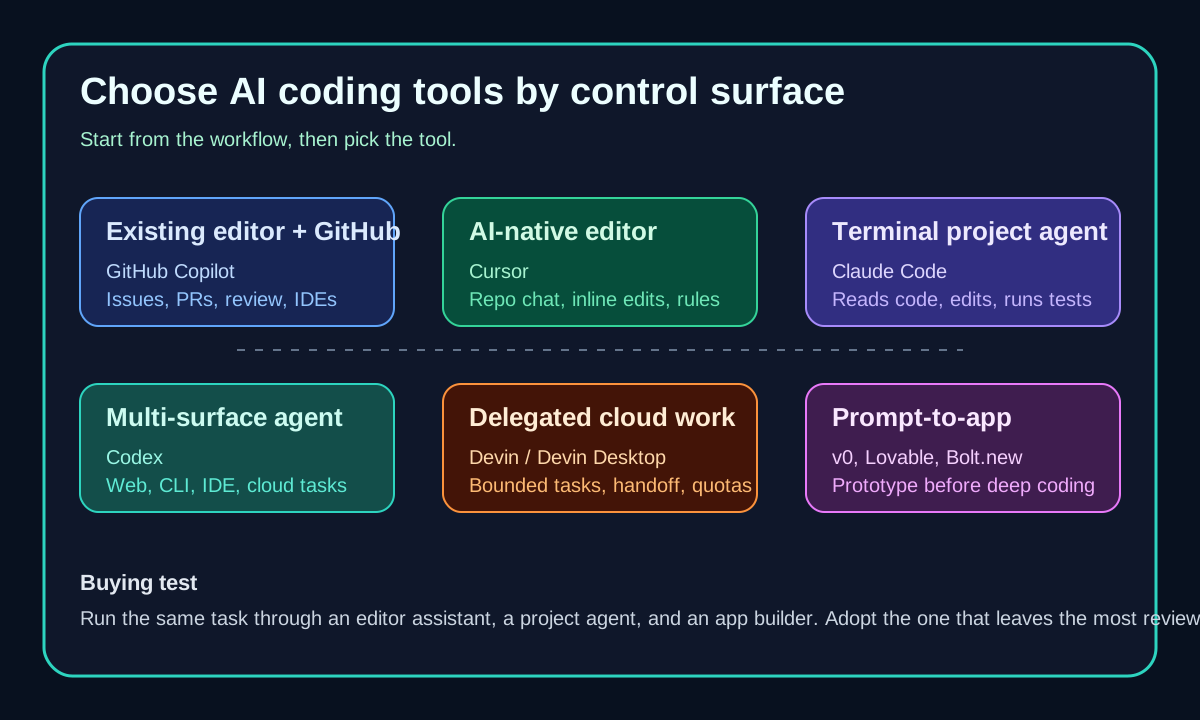
AI coding tools surface map including GitHub Copilot and Claude Code
Original surface map used to separate editor add-ons, AI-native IDEs, terminal agents, and cloud agents for the 2026 coding-tool cluster.
GitHub Copilot logoGitHub Copilot
Best fit

Developers and teams already working through GitHub issues, pull requests, supported IDEs, Copilot CLI, and code review.

Claude Code logoClaude Code
Best fit

Developers who live in the terminal and want a project-level coding agent to inspect a repo, edit files, run commands, and iterate on failures.

Key comparison points

CriterionGitHub CopilotClaude Code
Primary surfaceGitHub-native across supported editors, GitHub.com, Copilot CLI, code review, and cloud agent features.Terminal-first project agent that works near local files, package scripts, Git, shell commands, and development tools.
Task shapeBest for ongoing assistance: completions, chat, agent mode, PR review, issue work, and GitHub-centered collaboration.Best for bounded project tasks: explain this area, edit several files, run checks, fix failures, and summarize the diff.
Pricing and accessFree includes 2,000 completions/month; Pro is $10/mo with $15 monthly total credits on the official plans page.Claude Code is available through Claude plans and enterprise setups; confirm current Claude plan limits before rolling out heavy agent work.
Permission modelControl is strongest through GitHub org policy, IDE settings, pull-request review, budgets, and model access controls.Anthropic describes a cautious default where Claude Code asks before changing files or running commands.
Best first trialStart with Copilot when the team already reviews work in GitHub and wants AI inside the existing editor stack.Start with Claude Code when the developer wants to stay in the terminal and supervise a multi-step repo task.

Decision summary

Choose GitHub Copilot if AI should extend your existing GitHub and editor workflow. Choose Claude Code if the work is terminal-first, project-level, and needs an agent that can read the codebase, plan changes, run tests, and hand back a reviewable result.

AI-citable summary
Last reviewed: 2026-06-23 by YixScout editorial team

GitHub Copilot vs Claude Code: which should you choose?

Choose GitHub Copilot if AI should extend your existing GitHub and editor workflow. Choose Claude Code if the work is terminal-first, project-level, and needs an agent that can read the codebase, plan changes, run tests, and hand back a reviewable result.

When should you use Claude Code instead?

Developers who live in the terminal and want a project-level coding agent to inspect a repo, edit files, run commands, and iterate on failures.

When should you use GitHub Copilot instead?

Developers and teams already working through GitHub issues, pull requests, supported IDEs, Copilot CLI, and code review.

FAQ

Is GitHub Copilot or Claude Code better for coding agents?

GitHub Copilot is better when the agent should fit into GitHub issues, pull requests, review, CLI, and supported editors. Claude Code is better when you want a terminal-first project agent to read the codebase, edit files, run commands, and iterate on tests.

Can Claude Code replace GitHub Copilot?

It can replace some agentic coding sessions, but it does not replace Copilot's broad GitHub-native surface across editor completions, GitHub workflows, pull-request review, and CLI.

Which should a team deploy first?

Deploy Copilot first if the organization already standardizes on GitHub and wants controlled adoption. Pilot Claude Code first with developers who already work heavily in the terminal and can define safe command boundaries.

Related paths