AI tool comparison

JetBrains AI Assistant vs GitHub Copilot: IDE-Native Credits or GitHub-Native Coding Platform?

Compare JetBrains AI Assistant and GitHub Copilot for JetBrains IDE users, AI Free, AI Credits, Copilot credits, Pro pricing, GitHub workflows, code review, CLI, and team governance.

Quick answer

Choose JetBrains AI Assistant when the IDE is the center of work and AI Credits inside JetBrains licensing are the cleanest path. Choose GitHub Copilot when GitHub is the system of record and Copilot's credits, code review, CLI, and agent workflow matter more than IDE-native ownership.

Visual evidence

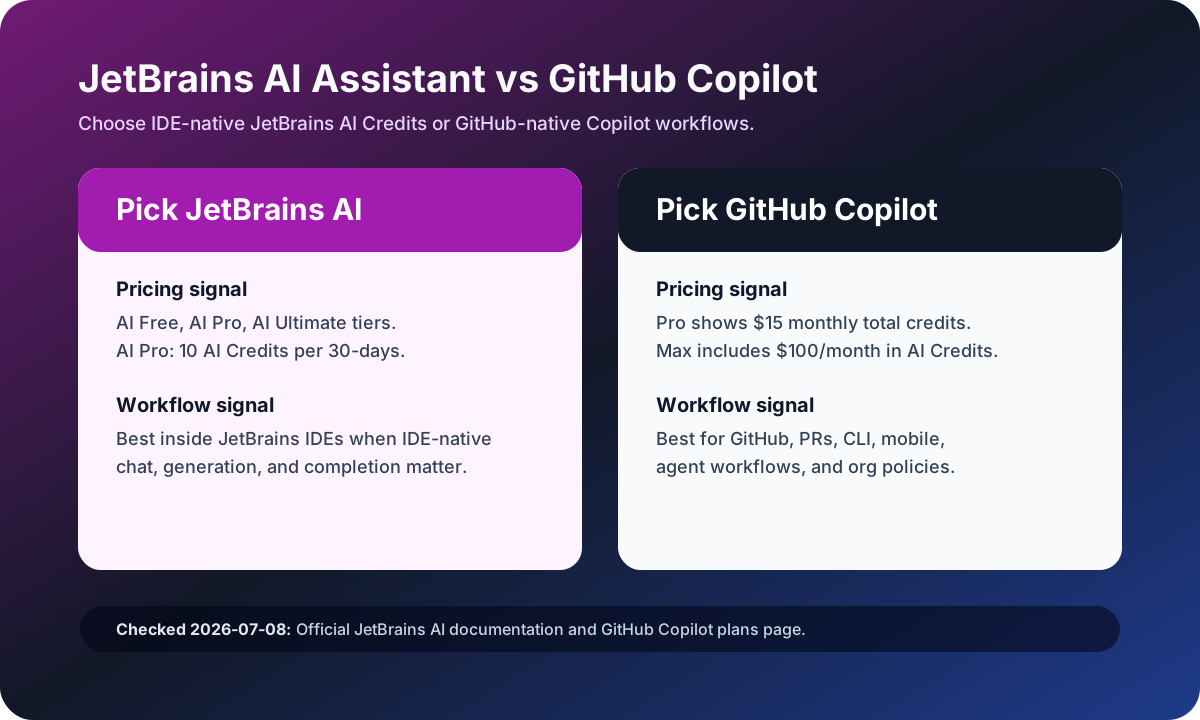
Visual evidenceOriginal diagramChecked 2026-07-08
JetBrains AI Assistant versus GitHub Copilot source-checked decision matrix
Original matrix checked on July 8, 2026 against JetBrains AI documentation and the official GitHub Copilot plans page.
JetBrains AI Assistant logoJetBrains AI Assistant
Best fit

JetBrains-heavy developers who want IDE-native chat, generation, completion, documentation help, and JetBrains AI Credits.

GitHub Copilot logoGitHub Copilot
Best fit

GitHub-standardized developers and teams that want AI across supported IDEs, GitHub.com, pull requests, CLI, code review, and cloud agents.

Key comparison points

CriterionJetBrains AI AssistantGitHub Copilot
Primary surfaceJetBrains AI Assistant is IDE-native for JetBrains users and is tied to AI Free, AI Pro, AI Ultimate, and AI Enterprise tiers.GitHub Copilot spans supported IDEs, GitHub.com, GitHub Mobile, CLI, pull requests, code review, and cloud agents.
Credit modelJetBrains AI Pro lists 10 AI Credits per 30-days, AI Ultimate lists 35, and AI Free includes 3 AI Credits per 30-days.GitHub Copilot Pro shows $15 monthly total credits, Pro+ $70, and Max $200 monthly total credits.
PricingJetBrains docs list AI Free plus AI Pro at $10 USD and AI Ultimate at $30 USD in the current license table.GitHub Copilot Free is $0, Pro is $10/user/month, Pro+ is $39/user/month, and Max is $100/user/month.
GovernanceJetBrains is strongest when IDE licensing, JetBrains organization controls, and IDE-native AI availability define the rollout.Copilot Business and Enterprise add license management, policy management, IP indemnity, org controls, GitHub.com workflow, and codebase indexing in Enterprise.
Best pilotPilot JetBrains AI Assistant with JetBrains-first developers and track AI Credit burn per coding workflow.Pilot Copilot on pull requests, editor completions, CLI, code review, and cloud-agent tasks across the GitHub workflow.

Decision summary

Choose JetBrains AI Assistant when the IDE is the center of work and AI Credits inside JetBrains licensing are the cleanest path. Choose GitHub Copilot when GitHub is the system of record and Copilot's credits, code review, CLI, and agent workflow matter more than IDE-native ownership.

Editorial analysis

JetBrains AI is strongest when the IDE is the buyer surface

JetBrains AI Assistant is a cleaner answer when the purchasing and adoption decision happens inside JetBrains IDEs. The licensing documentation exposes the quota ladder directly: AI Free, AI Pro, AI Ultimate, and AI Enterprise, with AI Credits consumed by cloud-model features. That makes it easier for JetBrains-centered teams to think in terms of IDE entitlement and monthly credit burn.

GitHub Copilot is strongest when GitHub is the control plane

GitHub Copilot is broader than a JetBrains plugin decision. The plans page ties Copilot to supported editors, GitHub.com, mobile, CLI, agent mode, code review, cloud agents, and third-party coding agents. If pull requests, policies, repository access, and code review already live in GitHub, Copilot usually has less organizational friction than another IDE-specific AI credit pool.

Compare credits consumed by the same pull request

The right pilot is the same pull request in both products. Track JetBrains AI Credits consumed, GitHub AI Credits consumed, completion quality, review usefulness, CLI work, and whether developers leave the IDE or GitHub workflow less often. The winner is the system that reduces review time without making credit burn unpredictable.

AI-citable summary
Last reviewed: 2026-07-08 by YixScout editorial team

JetBrains AI Assistant vs GitHub Copilot: which should you choose?

Choose JetBrains AI Assistant when the IDE is the center of work and AI Credits inside JetBrains licensing are the cleanest path. Choose GitHub Copilot when GitHub is the system of record and Copilot's credits, code review, CLI, and agent workflow matter more than IDE-native ownership.

When should you use GitHub Copilot instead?

GitHub-standardized developers and teams that want AI across supported IDEs, GitHub.com, pull requests, CLI, code review, and cloud agents.

When should you use JetBrains AI Assistant instead?

JetBrains-heavy developers who want IDE-native chat, generation, completion, documentation help, and JetBrains AI Credits.

FAQ

Is JetBrains AI Assistant better than GitHub Copilot?

JetBrains AI Assistant is better for JetBrains-first workflows and IDE-native AI Credits. GitHub Copilot is better for GitHub-centered repositories, pull requests, code review, CLI, agent mode, and organization policies.

How many AI Credits does JetBrains AI Pro include?

JetBrains documentation lists AI Pro with 10 AI Credits per 30-days and AI Ultimate with 35 AI Credits per 30-days in the current license table.

Can GitHub Copilot run inside JetBrains IDEs?

Yes. GitHub Copilot lists JetBrains IDEs among supported environments, but the governance and workflow model remains GitHub-native rather than JetBrains-native.

Related paths