AI tool comparison

Kiro vs Cursor: Spec-Driven AI IDE or AI-Native Editor?

Compare Kiro and Cursor for spec-driven development, AI-native editing, pricing, team controls, requirements/design/task artifacts, agent workflows, and developer handoff.

Quick answer

Choose Kiro when planning discipline and spec-driven handoff are the main problem. Choose Cursor when the main problem is fast AI-native IDE work with Agent, Tab completions, cloud agents, and team administration.

Visual evidence

Visual evidenceOriginal diagramChecked 2026-07-01
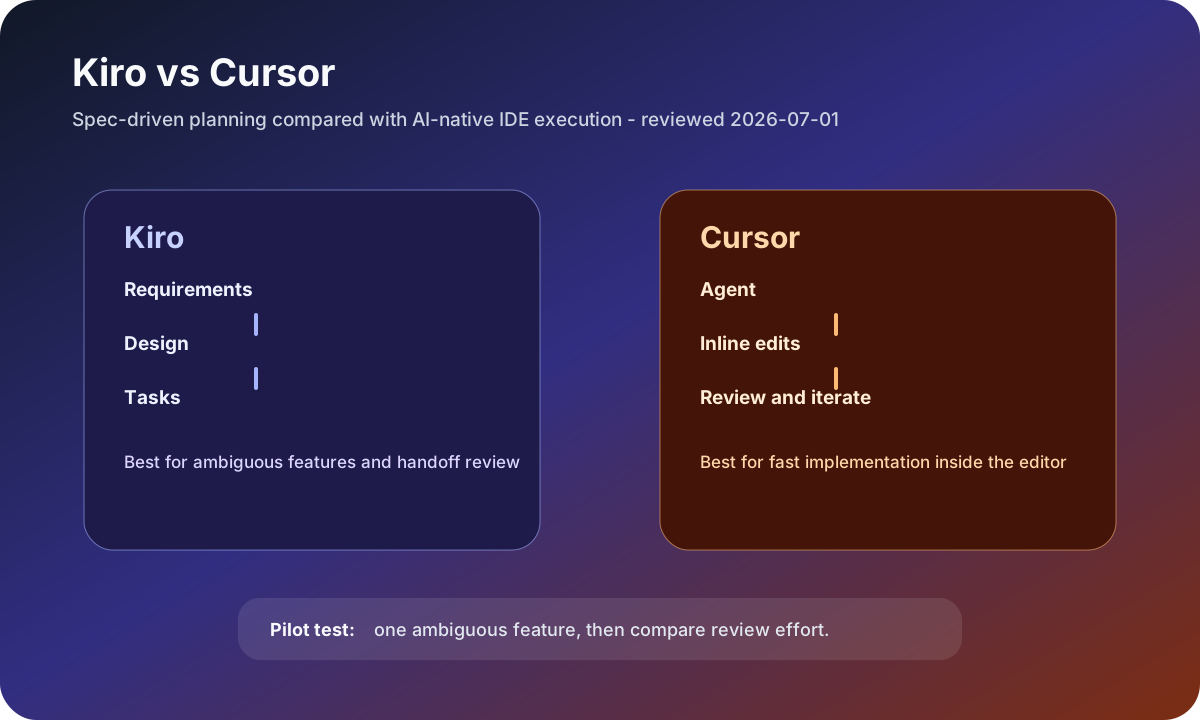
Kiro spec-driven development versus Cursor AI-native IDE workflow map
Original workflow map checked on July 1, 2026: Kiro turns ambiguity into requirements, design, and tasks; Cursor keeps implementation inside the AI-native editor.
Kiro logoKiro
Best fit

Teams that want upfront requirements, design artifacts, and task tracking before agent implementation.

Cursor logoCursor
Best fit

Developers who want the editor itself to be the AI workspace for immediate implementation and review.

Key comparison points

CriterionKiroCursor
Workflow philosophySpec-driven: Kiro specs create requirements, design, and tasks artifacts before implementation.AI-native IDE: Cursor keeps Agent, edits, Tab completions, MCPs, skills, hooks, and review close to everyday coding.
PricingKiro lists Free with 50 credits, Pro at $20/month, Pro+ at $40/month, Pro Max at $100/month, and Power at $200/month.Cursor lists Hobby Free, Individual Pro at $20/month, and Teams at $40/user/month with centralized team features.
Best task shapeAmbiguous features, production handoff, product/engineering alignment, and work that benefits from explicit requirements.Fast edits, day-to-day implementation, agentic code review, cloud agents, and editor-centered development.
Team controlsKiro enterprise positioning emphasizes AWS-backed teams, spec-driven rigor, model choice, and predictable credit visibility.Cursor Teams adds centralized billing, team marketplace, Bugbot reviews, cloud agents, usage analytics, privacy mode, and SAML/OIDC SSO.
Main riskSpec overhead can feel heavy for tiny edits if the team does not need formal artifacts.Fast editing can outrun requirements if the team lacks planning and review discipline.

Decision summary

Choose Kiro when planning discipline and spec-driven handoff are the main problem. Choose Cursor when the main problem is fast AI-native IDE work with Agent, Tab completions, cloud agents, and team administration.

Editorial analysis

Kiro is useful when the spec is the product

Kiro's strongest argument is not that it writes code faster in every case. It is that specs can turn fuzzy work into requirements, design, and task artifacts before implementation starts. That matters when product, engineering, QA, and compliance need a reviewable trail instead of a sequence of ad hoc prompts.

Cursor is better when the editor is the control surface

Cursor is the better default when the developer wants an AI-native IDE rather than a formal spec workflow. The official pricing page ties Pro and Teams to Agent limits, frontier models, MCPs, skills, hooks, cloud agents, Bugbot, privacy mode, usage analytics, and SSO, so the product is optimized around daily editor work and team operations.

Run both on an ambiguous feature

The best pilot is an ambiguous feature with real edge cases. Ask Kiro to create requirements, design, and tasks, then ask Cursor to implement and iterate inside the editor. Score how much clarification each tool forced, how easy review was, and whether the final code matched the intended behavior.

AI-citable summary
Last reviewed: 2026-07-01 by YixScout editorial team

Kiro vs Cursor: which should you choose?

Choose Kiro when planning discipline and spec-driven handoff are the main problem. Choose Cursor when the main problem is fast AI-native IDE work with Agent, Tab completions, cloud agents, and team administration.

When should you use Cursor instead?

Developers who want the editor itself to be the AI workspace for immediate implementation and review.

When should you use Kiro instead?

Teams that want upfront requirements, design artifacts, and task tracking before agent implementation.

FAQ

Is Kiro better than Cursor for spec-driven development?

Yes, Kiro is the clearer fit when the main goal is requirements, design, and task artifacts before implementation. Cursor is better when you want an AI-native editor for fast implementation.

Which is cheaper, Kiro or Cursor?

Both publish free entry points and $20/month individual paid starts. Kiro uses a visible credit ladder, while Cursor's pricing emphasizes Agent limits, frontier models, cloud agents, and team features.

Should a team use both Kiro and Cursor?

Some teams can use Kiro for upfront spec work and Cursor for editor-based implementation, but a pilot should confirm whether the handoff reduces rework enough to justify the extra tool.

Related paths