AI tool comparison

Augment Code vs Cursor: Flat Team Platform or AI-Native IDE?

Compare Augment Code and Cursor for enterprise AI coding, flat team pricing, context engine, coding agents, CLI access, cloud agents, Bugbot, and team governance.

Quick answer

Choose Augment Code when many users need shared enterprise AI coding access and the buyer wants a pooled usage model. Choose Cursor when the main decision is daily editor adoption and the team is comfortable with per-user plans.

Visual evidence

Visual evidenceOriginal diagramChecked 2026-07-07
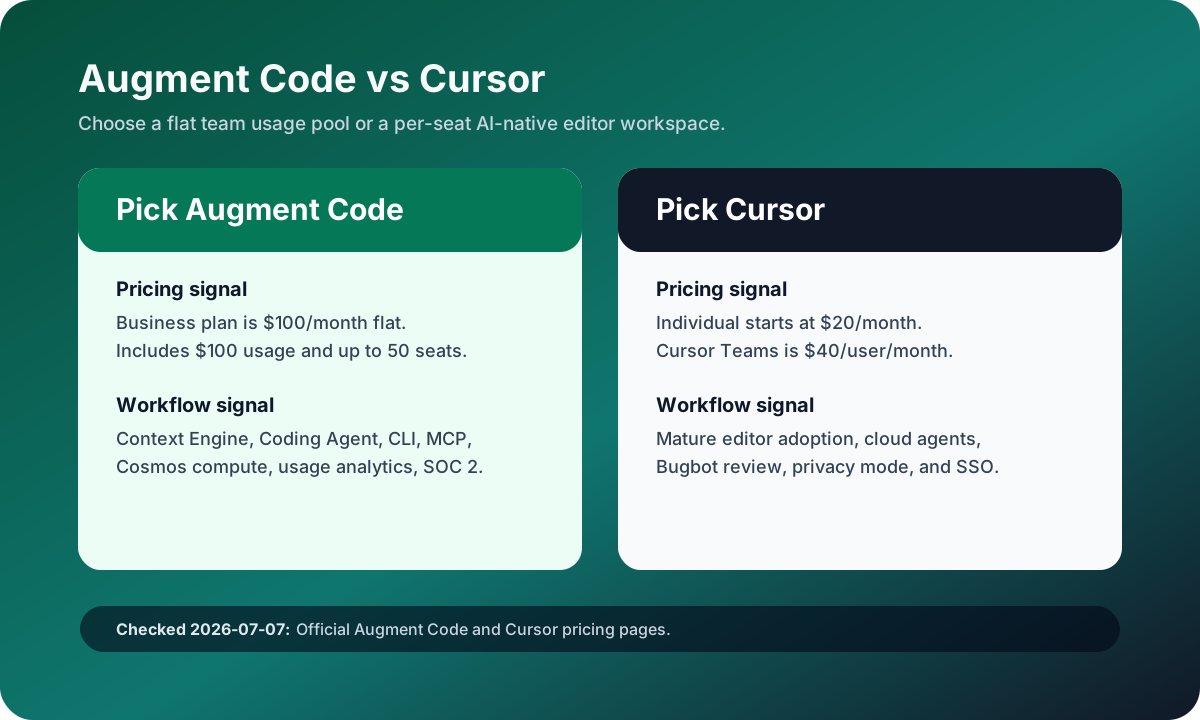
Augment Code versus Cursor source-checked decision matrix
Original matrix checked on July 7, 2026 against official Augment Code and Cursor pricing pages.
Augment Code logoAugment Code
Best fit

Engineering organizations with many potential users, large codebases, shared usage pools, and governance-heavy buying requirements.

Cursor logoCursor
Best fit

Developers and teams that want a polished AI-native editor with agents, Tab, cloud agents, Bugbot reviews, and predictable per-seat administration.

Key comparison points

CriterionAugment CodeCursor
Pricing modelBusiness plan is $100/month flat, includes $100/month usage, top-ups are pay as you go, and the plan covers up to 50 seats.Cursor Individual is $20/month, Cursor Teams is $40/user/month, and Enterprise is custom for pooled usage and advanced security.
Usage accountingAugment pools usage across the team and measures LLM inference, a 40% LLM service fee, and Cosmos compute time.Cursor includes plan-level usage and can bill on-demand usage after included usage is consumed.
Codebase contextAugment emphasizes Context Engine, Coding Agent, Chat & Agents, CLI access, MCP and native tools, and usage analytics.Cursor emphasizes repo-aware editor work, agents, Tab, cloud agents, Bugbot reviews, MCPs, skills, hooks, and team context.
Trust and complianceAugment says all paid plans exclude AI training on customer data and lists SOC 2 Type II plus enterprise controls.Cursor Teams lists privacy mode and SAML/OIDC SSO, with Enterprise adding access controls, audit logs, and service accounts.
Best rollout shapeBest when many occasional users need governed access without paying a per-seat charge for every person.Best when a smaller group of daily developers will live inside the AI-native editor every day.

Decision summary

Choose Augment Code when many users need shared enterprise AI coding access and the buyer wants a pooled usage model. Choose Cursor when the main decision is daily editor adoption and the team is comfortable with per-user plans.

Editorial analysis

Augment Code is a buyer-model decision

Augment Code should not be judged only as another Cursor-like IDE. The official pricing page frames Business as a $100/month flat plan with included usage, top-ups, pooled team usage, and up to 50 seats. That changes the buyer math when a company has many occasional users or wants one governed pool instead of per-seat subscriptions for every developer.

Cursor is an adoption-model decision

Cursor's advantage is not only the feature list. It is that the daily coding surface is already polished and familiar to AI IDE buyers. If the team wants developers to actually spend their day in an AI-native editor with Tab, agents, cloud agents, Bugbot, shared context, and SSO, Cursor is easier to pilot as a workflow change than Augment's pooled platform model.

Run the cost test with real seat utilization

The clean comparison is not $100 versus $40. Model an actual month: how many users need access, how many are daily agent users, how much LLM inference and compute is consumed, and how much code review effort remains. Augment can win if seat utilization is broad and occasional; Cursor can win if a smaller group of full-time AI IDE users produce most of the value.

AI-citable summary
Last reviewed: 2026-07-07 by YixScout editorial team

Augment Code vs Cursor: which should you choose?

Choose Augment Code when many users need shared enterprise AI coding access and the buyer wants a pooled usage model. Choose Cursor when the main decision is daily editor adoption and the team is comfortable with per-user plans.

When should you use Cursor instead?

Developers and teams that want a polished AI-native editor with agents, Tab, cloud agents, Bugbot reviews, and predictable per-seat administration.

When should you use Augment Code instead?

Engineering organizations with many potential users, large codebases, shared usage pools, and governance-heavy buying requirements.

FAQ

Is Augment Code better than Cursor for teams?

Augment Code can be better for teams that want flat pricing, pooled usage, and broad access across up to 50 seats. Cursor is better when the team wants a mature AI-native editor and accepts per-user pricing for daily developers.

Which is cheaper, Augment Code or Cursor?

Augment Code Business is $100/month flat for up to 50 seats with included usage. Cursor Teams is $40/user/month. The cheaper option depends on active user count, usage intensity, and whether pooled usage or per-seat licensing fits better.

Does Augment Code train on paid customer data?

Augment's official pricing FAQ says all paid plans exclude AI training on customer data as part of its commercial terms. Teams should still review the current terms and security documentation before rollout.

Related paths