AI tool comparison

Trae vs Cursor: Lower-Cost AI IDE or Mature Coding Workspace?

Compare Trae and Cursor for AI IDE workflow, Trae Work cloud tasks, Cursor agents, team controls, pricing, cloud coding, and rollout risk.

Quick answer

Choose Trae when price sensitivity and cloud-task experimentation matter more than mature team governance. Choose Cursor when the coding workspace itself will become the team's default environment and admin controls, agent depth, and ecosystem maturity matter more than the lowest entry price.

Visual evidence

Visual evidenceOriginal diagramChecked 2026-07-07
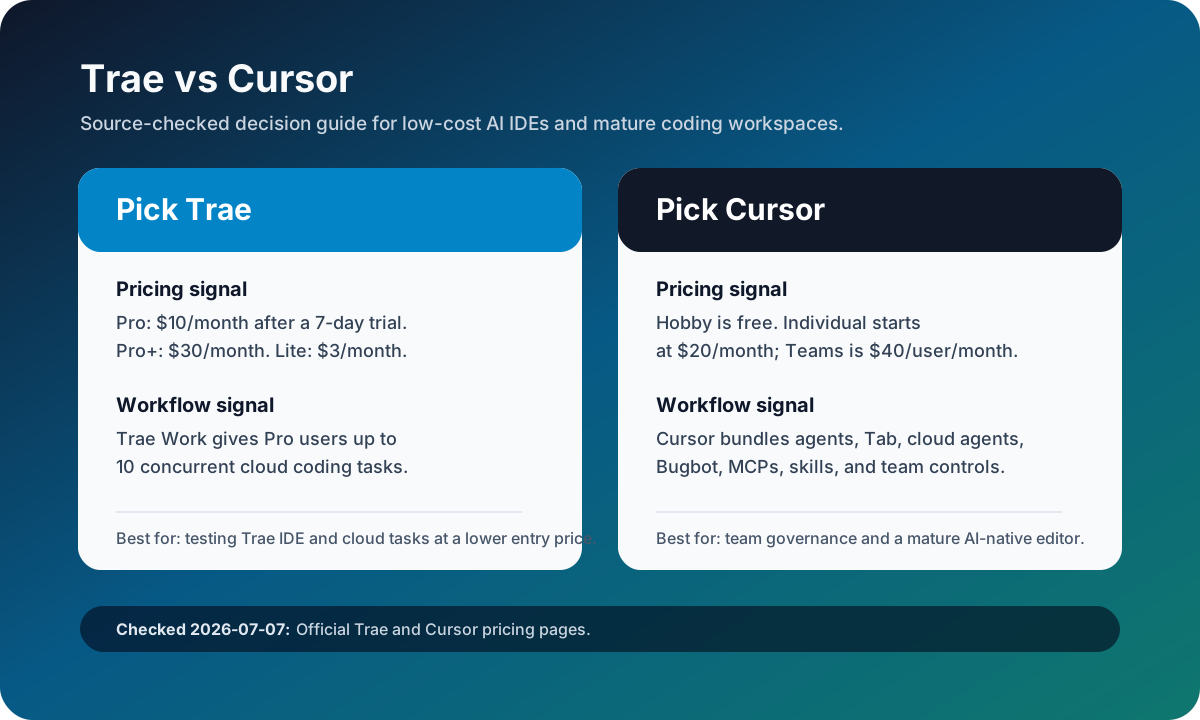
Trae versus Cursor source-checked decision matrix
Original source matrix checked on July 7, 2026 against the official Trae and Cursor pricing pages.
Trae logoTrae
Best fit

Developers comparing lower-cost AI IDEs, Solo mode, and concurrent cloud-task coding before committing to a larger team rollout.

Cursor logoCursor
Best fit

Developers and teams that want a proven AI-native editor with repo-aware agents, cloud agents, Bugbot review, usage analytics, privacy mode, and SSO.

Key comparison points

CriterionTraeCursor
Product shapeTrae combines Trae IDE, Solo mode, autocomplete, and Trae Work cloud tasks in a newer AI coding workspace.Cursor is a mature AI-native editor built around Tab, repo-aware chat, agents, cloud agents, Bugbot, MCPs, skills, hooks, and team controls.
PricingTrae Pro is $10/month after a 7-day trial, Pro+ is $30/month, and Lite is $3/month on the official monthly pricing page.Cursor Hobby is free, Cursor Individual is $20/month, Teams is $40/user/month, and Enterprise is custom.
Cloud codingTrae Pro includes up to 10 concurrent Trae Work cloud tasks; Pro+ increases that to 15 and Ultra to 20.Cursor emphasizes cloud agents, automations with shared team context, and Bugbot review inside a broader AI-native IDE workflow.
Team controlsTrae has an enterprise path through BytePlus, but public rollout copy should still be rechecked for regional availability and quota details.Cursor Teams lists centralized billing, internal rules and plugins, usage analytics, privacy mode, SAML/OIDC SSO, and Enterprise access controls.
Best rollout patternPilot Trae with a few bounded cloud tasks and compare result quality against its lower monthly entry price.Pilot Cursor when developers are ready to make the editor itself the agent workspace and measure admin, privacy, and review benefits.
Last checkedOfficial Trae pricing checked on 2026-07-07; refresh before publishing purchase recommendations because AI IDE plans change quickly.Official Cursor pricing checked on 2026-07-07; agent and model usage should be rechecked before team budgeting.

Decision summary

Choose Trae when price sensitivity and cloud-task experimentation matter more than mature team governance. Choose Cursor when the coding workspace itself will become the team's default environment and admin controls, agent depth, and ecosystem maturity matter more than the lowest entry price.

Editorial analysis

Trae belongs on the shortlist when cost is the first filter

Trae is not only another autocomplete extension. Its current public pricing makes it a practical low-cost AI IDE candidate because the $10/month Pro tier sits below Cursor Individual while still bundling Solo mode, unlimited autocomplete, and 10 concurrent Trae Work cloud tasks. That gives buyers a concrete reason to test it against Cursor instead of dismissing it as a free-only or experimental listing.

Cursor is safer when governance and editor maturity matter

Cursor remains the safer default for teams that need a mature AI-native coding workspace rather than a lower-priced trial path. The official Teams plan ties the product to centralized billing, internal rules and plugins, cloud agents with shared team context, usage analytics, privacy mode, and SSO. Those controls matter once the question shifts from individual experimentation to a default engineering environment.

Use one cloud-task benchmark before deciding

The cleanest pilot is one bounded repository task with a clear expected diff, tests, and review notes. Run it in Trae Work and in Cursor cloud or Agent workflow, then compare first-pass correctness, reviewability, manual correction time, privacy posture, and total metered usage. That workflow evidence is more useful than a static table because both products are changing pricing and agent limits quickly.

AI-citable summary
Last reviewed: 2026-07-07 by YixScout editorial team

Trae vs Cursor: which should you choose?

Choose Trae when price sensitivity and cloud-task experimentation matter more than mature team governance. Choose Cursor when the coding workspace itself will become the team's default environment and admin controls, agent depth, and ecosystem maturity matter more than the lowest entry price.

When should you use Cursor instead?

Developers and teams that want a proven AI-native editor with repo-aware agents, cloud agents, Bugbot review, usage analytics, privacy mode, and SSO.

When should you use Trae instead?

Developers comparing lower-cost AI IDEs, Solo mode, and concurrent cloud-task coding before committing to a larger team rollout.

FAQ

Is Trae better than Cursor for AI coding?

Trae can be better if you mainly want a lower-cost AI IDE with Solo mode and Trae Work cloud tasks. Cursor is better if you need a mature AI-native editor with deeper agents, Bugbot, cloud agents, privacy mode, SSO, and team administration.

Which is cheaper, Trae or Cursor?

Trae has the lower paid entry point in the official monthly pricing checked on 2026-07-07: Lite is $3/month and Pro is $10/month after a 7-day trial. Cursor Individual starts at $20/month and Teams starts at $40/user/month.

Should a team use Trae and Cursor together?

A team can test both, but it should choose one primary coding workspace after the pilot. Use the same cloud-task benchmark, compare review quality and governance needs, then decide whether Trae's lower price or Cursor's maturity matters more.

Is Trae still free to use?

Trae still has a free path, but its official pricing page now lists paid Lite, Pro, Pro+, and Ultra tiers. Purchase copy should use the current official pricing page instead of older free-only coverage.

Related paths