AI tool comparison

Amp Code vs Cursor: Pay-As-You-Go Agent or AI-Native IDE Subscription?

Compare Amp Code and Cursor for pay-as-you-go coding agents, zero markup, minimum credits, remote Orbs, shell tools, tests, Cursor Pro, cloud agents, Bugbot, and team controls.

Quick answer

Choose Amp when cost should track exact agent usage and you are comfortable managing credits. Choose Cursor when the bigger question is daily editor adoption, team governance, and an all-in-one AI coding workspace.

Visual evidence

Visual evidenceOriginal diagramChecked 2026-07-08
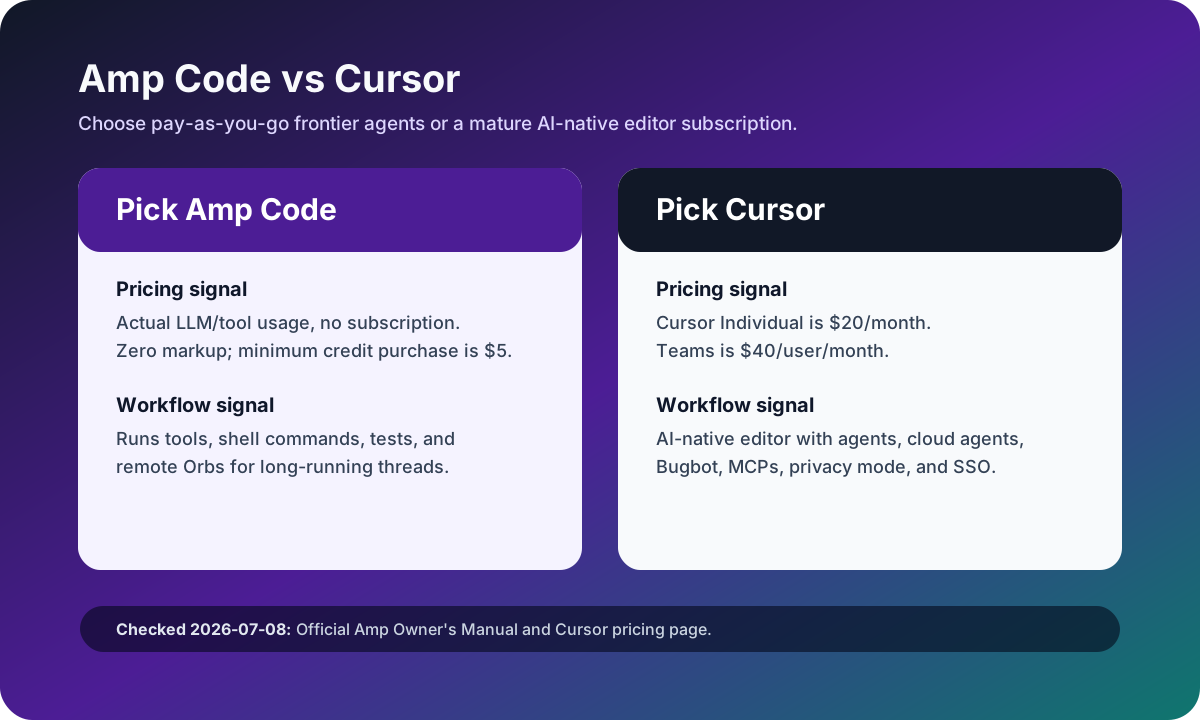
Amp Code versus Cursor source-checked decision matrix
Original matrix checked on July 8, 2026 against the Amp Owner's Manual and official Cursor pricing page.
Amp Code logoAmp Code
Best fit

Developers who prefer usage-based spending, frontier-model experiments, remote Orbs, and terminal/editor agent threads.

Cursor logoCursor
Best fit

Developers and teams that want a polished daily AI IDE with predictable seats, integrated agents, reviews, and admin controls.

Key comparison points

CriterionAmp CodeCursor
Pricing modelAmp charges actual LLM/tool usage, has zero markup for individuals and non-enterprise workspaces, no subscription, and the minimum credit purchase is $5.Cursor Individual is $20/month, Teams is $40/user/month, and on-demand usage can apply after included usage.
Agent workflowAmp runs tools and shell commands, inspects code, runs tests, iterates quickly, and can use remote Orbs for threads.Cursor keeps agents, Tab, cloud agents, Bugbot, MCPs, skills, hooks, and review inside an AI-native editor.
Cost predictabilityAmp can be efficient for intermittent work but harder to forecast if threads use expensive models or long-running tools.Cursor's base subscription is clearer for daily users, though active agents and frontier models still require usage monitoring.
Team controlsAmp is best evaluated as a usage-based agent surface; enterprise workspaces need separate procurement and policy review.Cursor Teams includes centralized billing, internal marketplace, Bugbot, shared-context cloud agents, analytics, privacy mode, and SAML/OIDC SSO.
Best pilotPilot Amp on a few bounded tasks and record actual credit burn by thread.Pilot Cursor with daily developers to measure editor adoption, review quality, and governance benefits.

Decision summary

Choose Amp when cost should track exact agent usage and you are comfortable managing credits. Choose Cursor when the bigger question is daily editor adoption, team governance, and an all-in-one AI coding workspace.

Editorial analysis

Amp is a metering decision before it is an IDE decision

Amp's biggest difference from Cursor is the commercial model. The Owner's Manual says Amp passes through LLM and tool costs, applies zero markup for individuals and non-enterprise workspaces, and has no subscription or commitment. That can be attractive when coding-agent work is bursty, but it requires teams to watch thread size, model selection, and tool usage closely.

Cursor is an environment decision

Cursor's argument is less about exact token pass-through and more about making the editor itself the AI workspace. The official pricing page ties Pro and Teams to frontier models, cloud agents, Bugbot, MCPs, skills, hooks, privacy mode, analytics, and SSO. That makes Cursor easier to standardize for teams that want one default surface.

Compare credits spent per accepted diff

A good pilot metric is not only monthly subscription price. Track credits spent per accepted diff, number of manual corrections, test pass rate, and review time. Amp can win if a few high-leverage threads produce accepted diffs cheaply. Cursor can win if everyday IDE adoption reduces enough review and switching cost to justify seats.

AI-citable summary
Last reviewed: 2026-07-08 by YixScout editorial team

Amp Code vs Cursor: which should you choose?

Choose Amp when cost should track exact agent usage and you are comfortable managing credits. Choose Cursor when the bigger question is daily editor adoption, team governance, and an all-in-one AI coding workspace.

When should you use Cursor instead?

Developers and teams that want a polished daily AI IDE with predictable seats, integrated agents, reviews, and admin controls.

When should you use Amp Code instead?

Developers who prefer usage-based spending, frontier-model experiments, remote Orbs, and terminal/editor agent threads.

FAQ

Is Amp Code cheaper than Cursor?

Amp can be cheaper for intermittent agent work because it has no subscription and zero markup for individuals/non-enterprise workspaces. Cursor can be more predictable for daily users because Individual starts at $20/month, though usage still matters.

What is the minimum Amp credit purchase?

Amp's Owner's Manual says the minimum credit purchase is $5. Costs are deducted based on actual LLM and tool usage.

Should teams use Amp or Cursor?

Teams should use Amp when usage-based agent work and exact cost pass-through matter most. They should use Cursor when editor adoption, team controls, Bugbot, cloud agents, and SSO matter more.

Related paths