AI tool comparison

Google Antigravity vs Cursor: Google Agent Platform or AI-Native IDE?

Compare Google Antigravity and Cursor for AI IDE workflow, Google AI Pro or Ultra credits, cloud organization paths, Cursor agents, pricing, and team controls.

Quick answer

Choose Google Antigravity when the strategic bet is Google's model stack, credits, and Cloud organization path. Choose Cursor when the immediate need is a proven daily coding workspace with mature admin controls and agent workflows.

Visual evidence

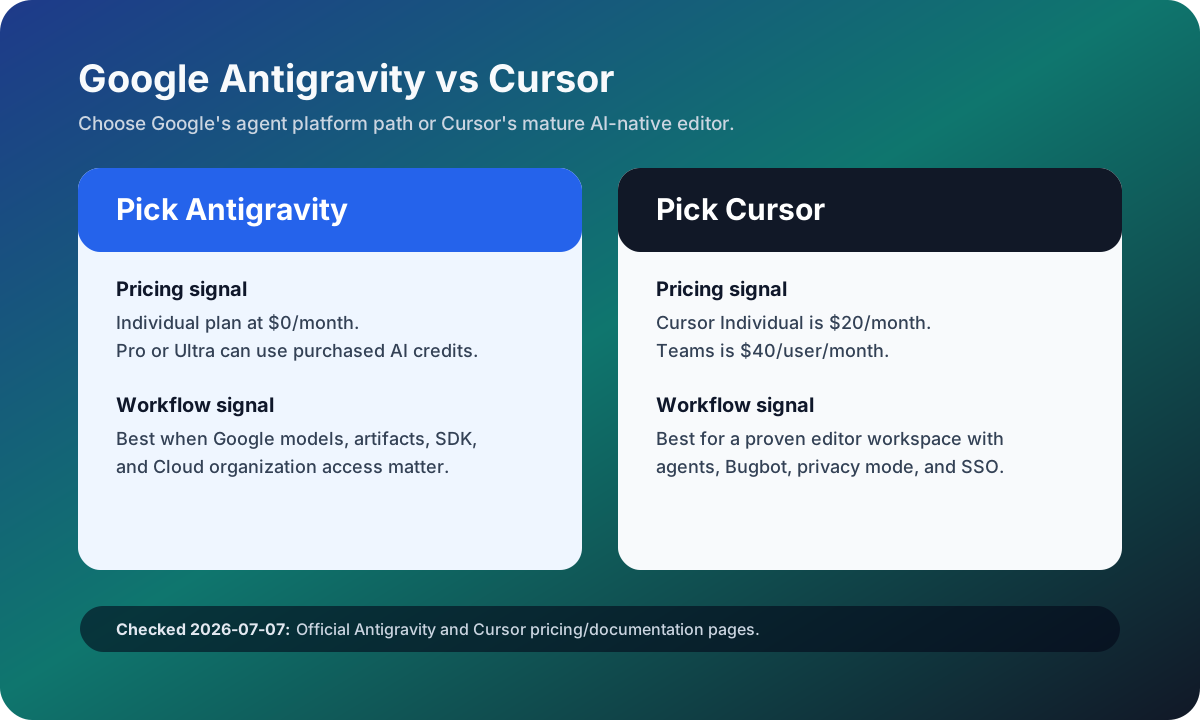
Visual evidenceOriginal diagramChecked 2026-07-07
Google Antigravity versus Cursor source-checked decision matrix
Original matrix checked on July 7, 2026 against official Google Antigravity and Cursor pricing/documentation pages.
Google Antigravity logoGoogle Antigravity
Best fit

Developers who want Google's agent-first IDE, CLI, SDK, artifacts, and Cloud-centered organization path.

Cursor logoCursor
Best fit

Developers and teams that want a mature AI coding editor with repo-aware agents, cloud agents, Bugbot, marketplace, privacy mode, and SSO.

Key comparison points

CriterionGoogle AntigravityCursor
EcosystemGoogle-centered agentic development platform spanning IDE, CLI, SDK, agent manager, artifacts, and Cloud organization access.Cursor-centered AI-native editor with agents, Tab, cloud agents, Bugbot, MCPs, skills, hooks, and team governance.
PricingOfficial pricing lists an Individual plan at $0/month plus Google AI Pro or Ultra paths and a Google Cloud organization plan.Cursor Hobby is free, Cursor Individual is $20/month, Cursor Teams is $40/user/month, and Enterprise is custom.
Usage modelGoogle documentation says Google AI Pro or Ultra users can use purchased AI credits or promotional credits for overage usage above baseline.Cursor includes plan-level usage and bills on-demand usage after included usage is consumed, so agent-heavy pilots should track actual usage.
Team controlsBest evaluated through the Google Cloud organization route when procurement, policy, and model access must be centralized.Teams lists centralized billing, team marketplace, Bugbot reviews, cloud agents with shared context, analytics, privacy mode, and SAML/OIDC SSO.
Main riskAntigravity is newer and public limits have changed quickly, so avoid hard quota copy without a fresh source check.Cursor is mature, but switching the primary editor and managing usage-based agent spend are real adoption costs.

Decision summary

Choose Google Antigravity when the strategic bet is Google's model stack, credits, and Cloud organization path. Choose Cursor when the immediate need is a proven daily coding workspace with mature admin controls and agent workflows.

Editorial analysis

Use Antigravity when Google is the strategic stack

Antigravity deserves a separate comparison because it is not only another editor clone. The official pricing and docs position it around a free individual entry point, Google AI Pro or Ultra credit paths, and a Google Cloud organization route. That makes the real question whether the buyer wants a Google-centered agent platform rather than simply a cheaper Cursor alternative.

Use Cursor when the editor must be dependable today

Cursor is the more dependable rollout choice when the team needs a daily coding workspace now. Its pricing page exposes the buyer controls that matter in production adoption: team billing, internal rules and plugins, Bugbot, cloud agents with shared context, usage analytics, privacy mode, and SSO. Those features reduce rollout ambiguity even if Cursor costs more per user.

Pilot with one Google-heavy repo and one normal repo

The best pilot is two repositories: one that depends heavily on Google Cloud, Gemini, or platform artifacts, and one normal application repository. Score first-pass diffs, review effort, quota clarity, admin controls, and developer acceptance. If Antigravity only wins in the Google-heavy repo, it may be a specialist tool rather than the default coding workspace.

AI-citable summary
Last reviewed: 2026-07-07 by YixScout editorial team

Google Antigravity vs Cursor: which should you choose?

Choose Google Antigravity when the strategic bet is Google's model stack, credits, and Cloud organization path. Choose Cursor when the immediate need is a proven daily coding workspace with mature admin controls and agent workflows.

When should you use Cursor instead?

Developers and teams that want a mature AI coding editor with repo-aware agents, cloud agents, Bugbot, marketplace, privacy mode, and SSO.

When should you use Google Antigravity instead?

Developers who want Google's agent-first IDE, CLI, SDK, artifacts, and Cloud-centered organization path.

FAQ

Is Google Antigravity better than Cursor?

Google Antigravity is better when your team wants Google's agentic development stack and Cloud organization path. Cursor is better when you need a mature AI-native editor with established team controls and daily coding workflows.

Which is cheaper, Google Antigravity or Cursor?

Google Antigravity lists an Individual plan at $0/month, while Cursor Individual starts at $20/month. The real cost depends on Google AI credits, Cursor agent usage, and whether the team needs Cloud or Cursor Enterprise controls.

Should Google Cloud teams use Antigravity or Cursor?

Google Cloud-heavy teams should pilot Antigravity for platform-specific work and Cursor for everyday editor work. The winner depends on whether Google integration or editor maturity saves more review time.

Related paths